

Website Account System & Player Dashboard Update

Hello everyone,
We’ve been working on a major website account update focused on making the player experience smoother, safer, and more connected. Players can now register, log in, manage their account, use the dashboard, change passwords, view account activity, and access several new account features directly from the website.
Account Registration & Login
- Players can now register a website account and reserve their matching in-game character name.
- Players can log in using either their username or email.
- Added forgot-password and reset-password pages with email reset links.
- Added a cleaner registration flow with live username checks, username suggestions, password checks, and improved validation.
- Fixed registration so new players are sent directly to their account page after creating an account.
- Added support for social sign-in options when enabled, including Discord login.
- Improved Discord login handling so players are returned properly to the login flow instead of error pages.
- Added a social registration finish step where players can choose a GrinderScape username and set a game password.
Player Dashboard & Account Panel
- Added a full account dashboard where players can manage their website account.
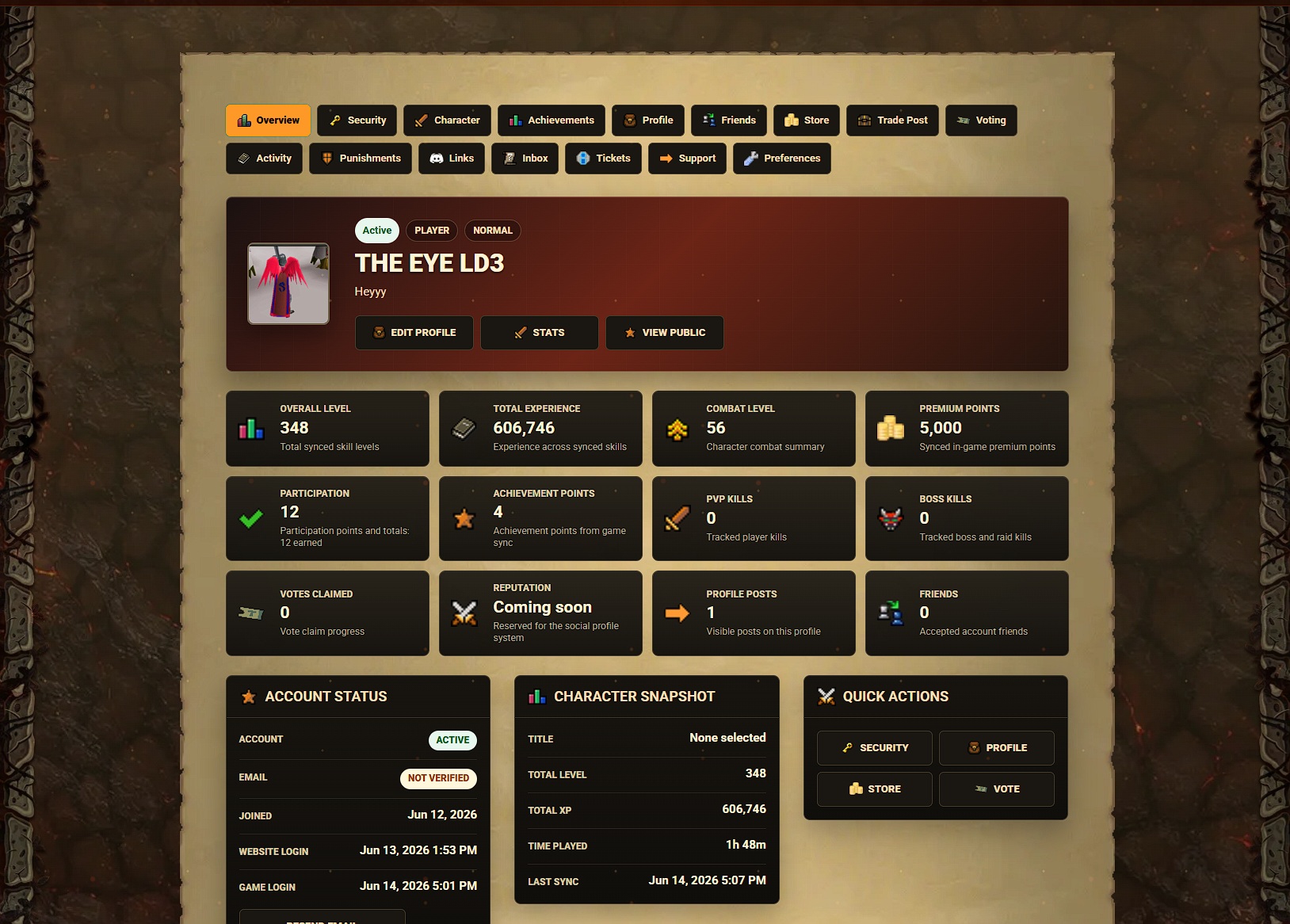
- Added account status, email verification, gameplay summaries, store totals, recent orders, and safe empty states for upcoming sections.
- Improved the account overview into a richer player hub with profile details, character stats, quick actions, recent activity, and recent orders.
- Added a compact signed-in account menu with quick links to the account panel, security page, tickets, and logout.
- Improved account navigation, quick-action buttons, icons, panels, and page styling to better match the GrinderScape website theme.
Account Security & Password Management
- Players can now change their website and game login password from the account security page.
- Added password-change email alerts for verified accounts.
- Added recent security activity so players can review logins, password resets, email verification events, and other important account actions.
- Added two-factor authentication support from the account security page.
- Added authenticator-app setup with recovery codes.
- Added Bank PIN status to the account security page.
- Improved account protection around linked services so social login cannot silently take over an existing account.
- Added a linked accounts page where players can view, refresh, link, or unlink supported sign-in services.
Character & Gameplay Sync
- Added a richer Character page where players can review synced in-game skill levels, total experience, character details, and gameplay sections.
- Improved account character stats so total level, total XP, combat level, and skill overview can display from synced character data.
- Players can now review synced Boss Kills and Collection Log counters from the account Character page.
- Improved the Character page with recent boss, raid, collection, and clue activity when synced.
- Improved character stat syncing so account-panel skill totals and point counters can refresh from game saves.
- Improved the character page point section with premium points, participation points, achievement points, PvP kills, boss and raid kills, vote claims, and reputation placeholders.
Achievements & Activity
- Players can now view synced achievement progress from the account panel.
- Added achievement cards with progress bars, categories, tiers, point rewards, and completion dates once achievements are synced.
- Improved hidden achievements so secret details stay hidden until completed or revealed.
- Improved account achievement displays so completed achievements, recent synced activity, and rank/title labels appear more clearly.
- Improved the account Activity page with filters, category icons, a cleaner timeline, and pagination.
- Improved Recent Activity empty states across account and public profile pages.
Voting, Store & Orders
- Players can now vote as their linked character directly from the account Voting page without retyping their name.
- Improved the Voting page with ready and cooldown cards for each vote site.
- Improved account Store summaries so claimed and ready-to-claim order totals display more reliably.
- Improved the account Store page with clearer recent order rows, ready-to-claim states, redeemed states, and order item summaries.
Support Tickets & Punishments
- Players can now create support tickets from the account panel.
- Players can track ticket status, category, priority, and conversation history.
- Added ticket reply threads so players can continue support conversations from their account.
- Added a new reply marker so players can quickly see when a support ticket has a fresh staff response.
- Improved support ticket replies so staff responses can show clearer staff names and rank icons when available.
- Fixed a bug where opening a support ticket conversation could show an error page.
- Players can now review account-visible punishment status, expiry timing, and appeal options.
- Improved punishment appeals so appeal tickets stay linked to the matching account action.
Inbox & Announcements
- Players can now use an account inbox for staff announcements.
- Added unread, read, archived, category, and priority filters.
- Added unread inbox counts to the account menu and account tabs.
- Added inbox space management so players can see message capacity, delete old messages, and keep room for future announcements.
- Improved inbox message pages so action buttons stay aligned across desktop and mobile layouts.
Trade Post & Market Features
- Added a Trade Post tab to the account panel where players can review active listings, recent sales, and recent purchases.
- Added Trade Post item watchlists so players can watch items and see matching live listings.
- Added Trade Post filters for active listings, sold items, purchases, undercut listings, lowest-price listings, and watchlist matches.
- Improved active listing rows with lowest-price and undercut indicators.
- Added Trade Post shop highlights so players can spot a seller’s newest, best-price, biggest-stack, and top-value listings.
- Public player profiles can now show active Trade Post listings with item images and market-history links.
- Added public player shop pages where players can browse, search, and sort a player’s active Trade Post listings.
- Improved seller and buyer names with public profile and shop links when profiles are visible.
- Improved market-history item pages with clearer live Trading Post listings, seller profile links, shop links, and a shortcut back to live Trading Post search.
- Improved Drop Logs so item icons and names open the matching market history page together.
Profiles, Friends & Social Features
- Players can now customize their website profile with a short bio, banner style, avatar display choice, and public visibility options.
- Added public player profile pages that can show safe character stats, top skills, and optional recent activity.
- Players can now upload a safe profile picture with size and image-type checks.
- Improved the profile picture uploader so players can click directly on their avatar preview to upload or change it.
- Improved profile bios with a longer character limit and cleaner safety rules.
- Players can now manage website friends from the account panel, including sending, accepting, removing, and blocking friend requests.
- Added profile posts with public, friends-only, and private visibility options.
- Public profiles can now show mutual friend counts, friend previews, and profile posts based on privacy settings.
- Added privacy controls for friend requests, friend previews, and profile posts.
- Fixed a bug where outgoing friend requests could appear cramped on the friends page.
Website Updates Page
- Improved the Updates page so announcements can appear as formatted posts with staff attribution.
- Improved the announcements layout, category browsing, featured posts, sharing metadata, and mobile spacing.
- Improved website update posts with support for hero images, thumbnails, and inline media.
- Improved update cards so formatted previews expand cleanly without repeated text or color issues.
- Players can now click usernames in homepage staff, middleman, voter, contributor, and PK streak sections to open public profiles.
Fixes & Polish
- Improved login, registration, password reset, email verification, and account pages so they now use the main GrinderScape website styling.
- Polished the account area with darker GrinderScape-styled panels, matching action buttons, and the normal website footer.
- Updated the account area to use the framed GrinderScape page background with side artwork.
- Added and adjusted game-style icons across account navigation, status cards, quick actions, store summaries, voting, activity, stats, inbox, tickets, Trade Post, and profile pages.
- Fixed layout issues where account panels could overlap the footer or stretch past their intended card area.
- Improved the support page with clearer recovery, store, client, contact, and ticket-history sections.
- Adjusted the Sigil of Barrows description to show its updated accuracy and bonus damage values.
Thank you for your patience while we continue improving the website account system. This update is a big step toward giving players a proper account hub with registration, login, dashboard features, password management, support tools, character syncing, profiles, and more.